
Connect monday.com with Salesmate CRM to automatically sync contacts, deals, and sales activities. Eliminate manual data entry, keep customer information updated, and streamline your sales workflow with the custom Salesmate app..
The Salesmate app for monday.com helps you:
Built for:
Automate your sales workflows by connecting monday.com with Salesmate CRM. From creating contacts and managing deals to synchronizing activities, keep your customer data updated automatically while reducing manual work and improving team productivity.

Overview
Automatically create new contacts in Salesmate whenever a lead is created or its status changes in monday.com.
How it works:
Result:
Every qualified lead is instantly added to your CRM without manual data entry.

Overview
Automatically create, update, and manage deals and activities while keeping monday.com synchronized with Salesmate.
How it works:
Result:
Your CRM and monday.com remain synchronized with accurate customer and sales data.
These intelligent workflows remove repetitive manual CRM updates, reduce administrative work, and keep monday.com and Salesmate synchronized in real time.
By automating contact creation, deal management, and activity tracking, your sales team can focus on building customer relationships instead of updating records manually
Follow these quick steps to install the Retell AI app and start using it inside your monday.com workspace.
Once the application is installed, navigate to “Add Item” within your workspace and select “Workflow” to begin.
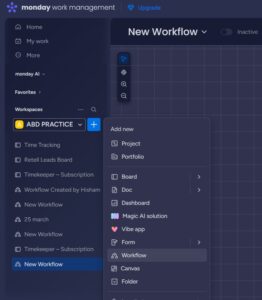
Enter a suitable name for your workflow and click on the “Create” button to proceed.

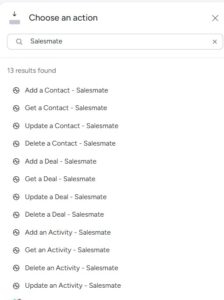
Similarly, in the Action section, search for “Salesmate” to view and select from the available actions.
Explore our powerful suite of custom apps and automation solutions designed to streamline your business or book a consultation to get tailored guidance for your needs.
A global digital agency building efficient, automated, and conversion-focused solutions.
Codex Solutions Int © 2026. All rights reserved