From Field to Folder on Autopilot: How Automation Eliminates the “8 PM Second Shift”
For service-based businesses, the job doesn’t always end when the technician leaves the customer’s property.
In fact, for many business owners and office teams, a second workday begins after hours. Photos need to be collected, customer folders need updating, job documentation needs organizing, and proof-of-work needs to be filed correctly.
This daily administrative burden creates hidden operational costs that most businesses simply accept as part of the job.
One of our recent automation projects solved this exact challenge by creating a fully automated documentation workflow that moves job photos from the field directly into organized customer folders—without any manual uploads, sorting, or filing.
The result? Faster documentation, improved organization, and hours of administrative work eliminated every week.
Why Manual Documentation Slows Growth
Many field service businesses still rely on manual processes after a job is completed:
Technicians send photos through WhatsApp
Office staff download and organize files
Customer folders are created manually
Proof-of-work is scattered across devices
Documentation takes hours to locate later
While these tasks may seem minor individually, they create significant inefficiencies as the business grows.
By automating the documentation process, businesses can:
Save Hours Every Week
Eliminate Manual Uploads
Improve Record Keeping
Reduce Human Error
Access Job Documentation Instantly
Scale Operations Without Additional Admin Work
Automation removes the friction between completed work and organized records.
How the Automation Works
Here’s the workflow we built step by step:
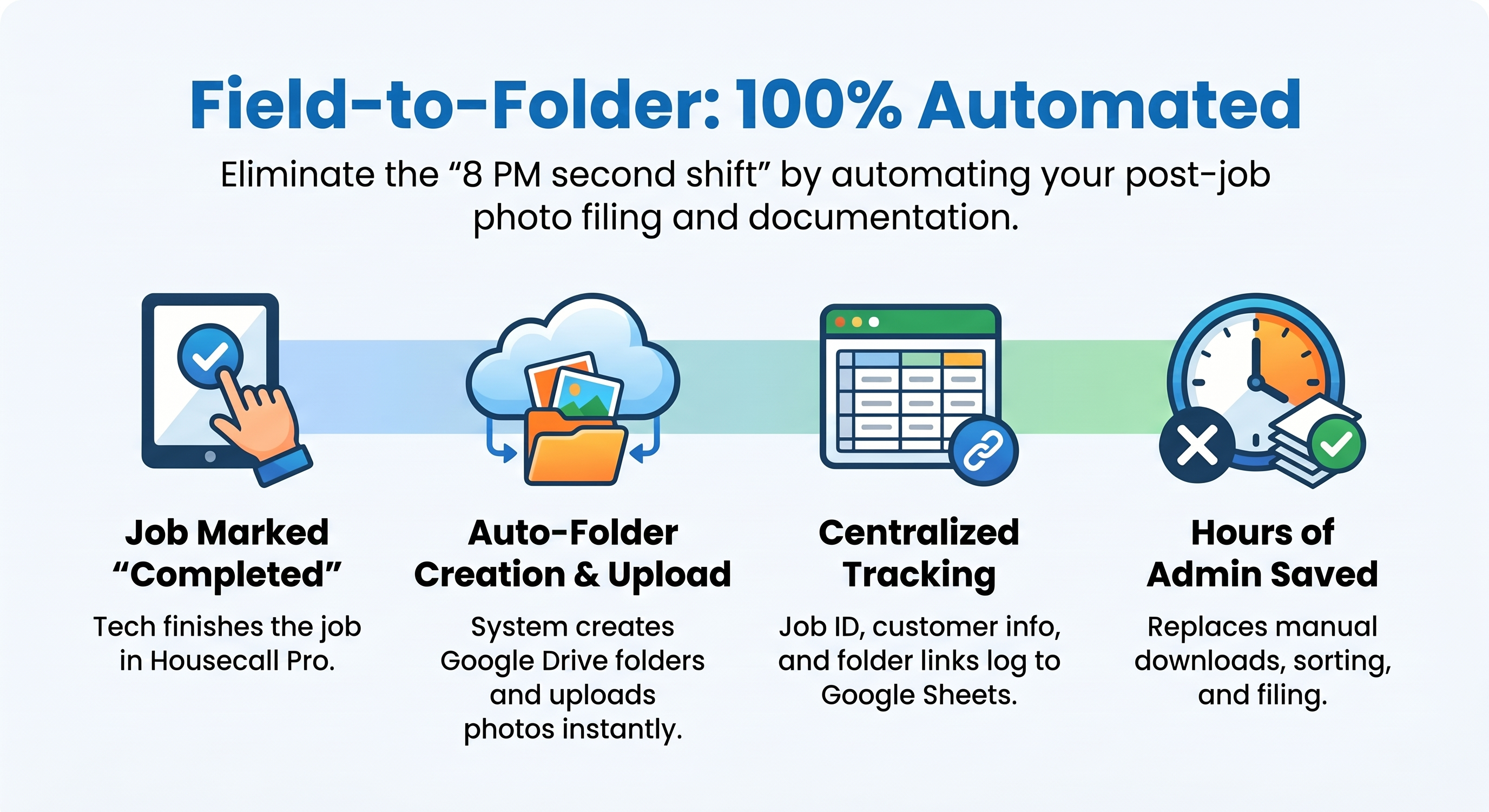
Job Completion Triggers the Workflow
Everything starts inside Housecall Pro.
When a technician marks a job as “Completed,” the automation launches automatically.
No emails.
No reminders.
No manual uploads.
Simply completing the job activates the entire documentation process.
Intelligent Customer Folder Management
The automation first checks Google Drive to determine whether a customer folder already exists.
If a folder exists:
The workflow prepares it for new documentation.
If a folder doesn’t exist:
A new customer folder is created automatically using predefined naming conventions.
This ensures every job has a properly organized destination.
No messy folders.
No duplicate directories.
No filing confusion.
Automatic Photo Retrieval
Once the folder structure is ready:
The system retrieves all job photos directly from Housecall Pro.
This can include:
Before photos
After photos
Inspection images
Proof-of-completion documentation
Additional technician uploads
Everything is gathered automatically without any manual intervention.
Instant Upload to Google Drive
The retrieved images are uploaded directly into the correct customer folder.
This creates a centralized location where teams can instantly access:
Project documentation
Customer records
Photo evidence
Historical job information
The process happens within minutes of job completion.
Centralized Tracking in Google Sheets
To improve operational visibility, every completed job is logged automatically.
The system records:
Job ID
Customer Name
Service Date
Folder Link
Documentation Status
This creates a searchable database that gives office teams instant access to every project record.
No more searching through hundreds of folders.
No more guessing where files are stored.
Everything is organized and accessible from one location.
Real-Time Access for Teams
Because everything is updated automatically:
Office staff can access documentation immediately
Managers can review completed work instantly
Customer service teams can respond faster
Invoices can be generated sooner
Insurance documentation can be located in seconds
The entire organization operates more efficiently.
The Impact
⏳ Hours Saved Every Week – No manual photo collection or uploads
📂 Organized Documentation – Every customer gets a structured folder
📸 Instant Proof-of-Work Storage – Photos available immediately
📋 Better Record Keeping – Centralized tracking system
🚀 Faster Administrative Processes – Less paperwork, more productivity
✅ Improved Scalability – Documentation grows automatically with the business
Instead of spending evenings organizing files, teams can focus on serving customers and growing the business.
Real-Life Use Case
Problem:
A service business was spending hours every week manually collecting job photos, creating customer folders, and organizing documentation after technicians completed work.
Solution:
Automating the workflow using Housecall Pro + Make + Google Drive + Google Sheets.
Result:
Automatic folder creation
Instant photo uploads
Centralized job tracking
Faster invoicing
Improved documentation management
Significantly reduced administrative workload
The business transformed its documentation process from a manual chore into a fully automated system.
Why Documentation Automation Matters
As service businesses grow, documentation requirements increase.
More jobs mean:
More photos
More customer records
More proof-of-work
More opportunities for filing mistakes
Without automation, administrative work grows at the same pace as revenue.
Automation breaks that cycle.
Instead of hiring additional staff to organize files, businesses can build systems that manage documentation automatically.
Perfect For:
Home service companies
Cleaning businesses
HVAC contractors
Plumbing companies
Electrical contractors
Roofing businesses
Landscaping companies
Property maintenance teams
Any field service business managing job photos and customer documentation
The Future of Field Service Operations
Modern service businesses don’t win by working longer hours.
They win by building smarter systems.
By connecting Housecall Pro, Google Drive, and Google Sheets through automation, businesses can:
Capture documentation automatically
Maintain organized records
Reduce administrative workload
Improve customer service
Scale without operational chaos
This is how high-performing service companies operate today.
Ready to Automate Your Documentation Workflow?
Automation doesn’t just save time—it creates capacity for growth.
By eliminating repetitive filing and documentation tasks, your team can focus on what truly matters:
Customer satisfaction
Service quality
Revenue growth
Business development
🚀 Start automating today and transform your documentation process into a scalable, self-managing system.
For a demo or consultation, JUST CONTACT US.