Stop Chasing Paperwork: How Automation Eliminates Post-Job Administrative Chaos
For field service businesses, contractors, maintenance companies, and home service providers, completing the job is only half the work.
But once technicians leave the job site, the administrative work begins. Teams often spend valuable time writing job notes, updating spreadsheets, notifying internal staff, preparing customer follow-ups, and tracking completed work across multiple systems.
The result is delayed communication, inconsistent documentation, missed follow-ups, and hours of repetitive administrative work that keep teams working long after the job is finished.
One of our recent automation projects solved this exact challenge for a field service business looking to streamline post-job operations and eliminate manual paperwork.
By connecting Housecall Pro, Make.com, Slack, Google Sheets, AI, and automated email workflows into a single intelligent system, we transformed a manual post-job process into a fully automated operations workflow.
The result? Instant internal notifications, AI-generated customer follow-ups, centralized job tracking, and more time spent serving customers instead of completing paperwork.
Why Manual Post-Job Administration Creates Bottlenecks
Many service businesses still rely on manual processes such as:
- Writing job completion notes
- Updating spreadsheets manually
- Notifying office staff
- Sending customer follow-up emails
- Tracking completed jobs
- Managing quality assurance records
As the number of completed jobs increases, these repetitive tasks quickly become overwhelming.
By automating post-job administration, businesses can:
- Eliminate Manual Paperwork
- Improve Team Communication
- Automate Customer Follow-Ups
- Centralize Job Records
- Strengthen Quality Assurance
- Scale Operations Without Additional Administrative Staff
Automation ensures every completed job is processed accurately and consistently without creating additional work for your team.
How the Automation Works
Completed Jobs Automatically Trigger the Workflow
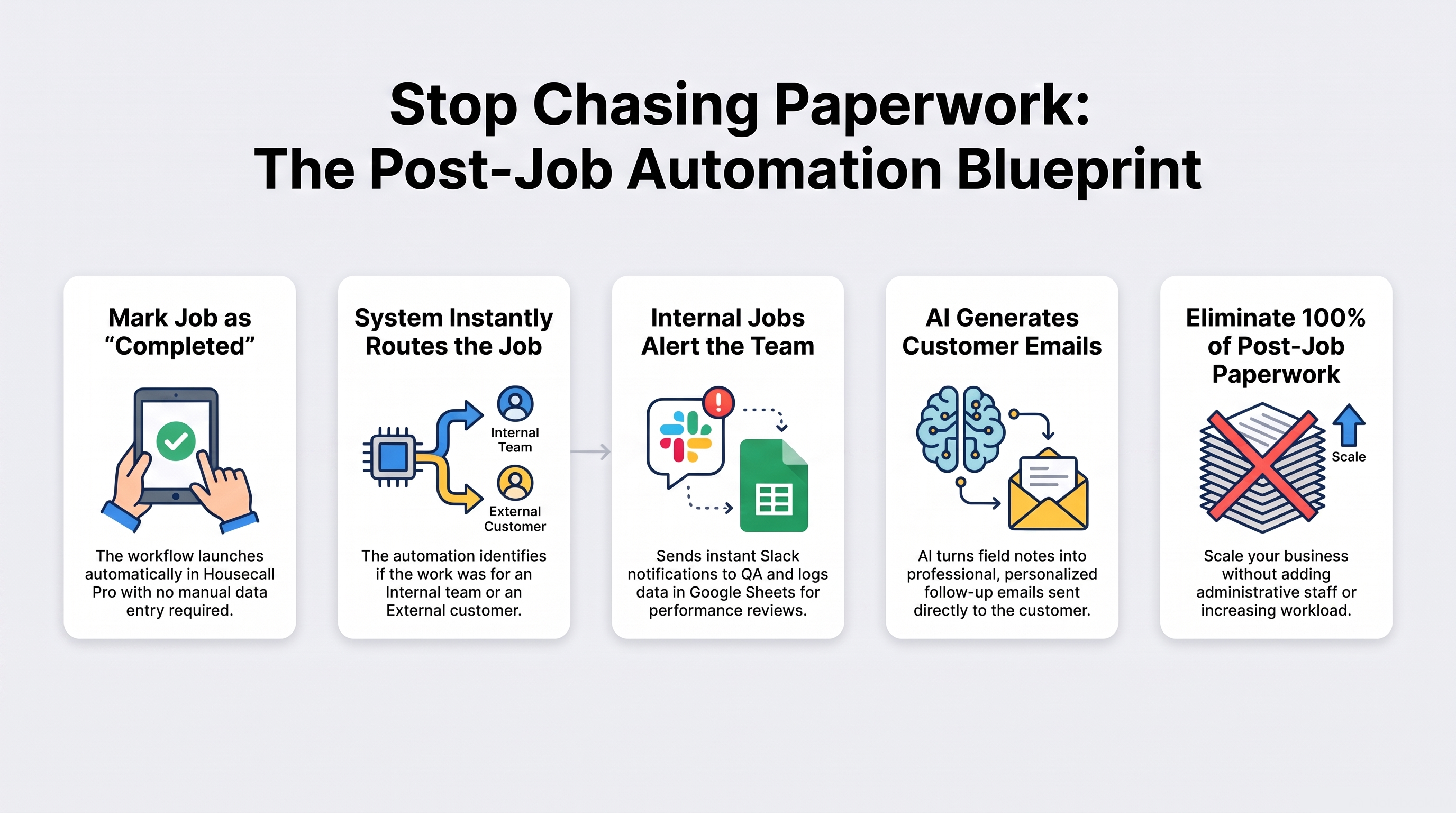
Everything begins when a technician marks a job as completed in Housecall Pro.
The automation continuously monitors completed jobs.
The moment a job is finished:
- The workflow launches automatically.
- No manual paperwork.
- No spreadsheet updates.
- No administrative delays.
Every completed job immediately enters the automated workflow.
The Workflow Identifies the Job Type
Once the job information is received:
The automation automatically determines whether the completed job is internal or customer-facing.
Based on the job type, the workflow follows the appropriate process without requiring manual decisions.
This ensures every completed job is handled correctly from the start.
Internal Jobs Notify the Operations Team
For internal jobs:
The automation instantly sends notifications to Slack.
The operations team immediately receives important job information, allowing them to:
- Review completed work
- Monitor quality assurance
- Track operational activity
- Respond quickly when necessary
At the same time, the completed job is automatically recorded in Google Sheets for reporting and long-term tracking.
Customer Follow-Ups Are Generated Automatically
For customer-facing jobs:
The automation collects the technician’s job notes and sends them to AI.
The AI automatically transforms field notes into professional customer communication.
The follow-up email can include:
- Summary of completed work
- Service information
- Professional recommendations
- Customer-friendly language
- Personalized messaging
Instead of writing emails manually, businesses deliver consistent and professional communication automatically.
Customer Emails Are Sent Automatically
Once the follow-up is generated:
The automation sends the personalized email directly to the customer.
Customers receive:
- Service completion confirmation
- Job summary
- Relevant information
- Professional communication
No manual email writing or sending is required.
Job Records Are Maintained Automatically
Every completed job is automatically recorded and organized.
The system maintains:
- Job history
- Internal activity
- Customer communication
- Quality assurance records
- Operational reporting
This creates a centralized post-job management system that supports future reporting and business growth.
The Impact
✔ Instant Internal Notifications – Keep operations teams informed as soon as jobs are completed.
✔ Reduced Administrative Work – Eliminate repetitive paperwork and manual updates.
✔ AI-Powered Customer Communication – Generate professional follow-up emails automatically.
✔ Improved Quality Assurance – Maintain organized job records and operational visibility.
✔ Better Customer Experience – Deliver timely and personalized service updates.
✔ Scalable Operations – Process more completed jobs without increasing administrative workload.
Instead of spending evenings completing paperwork, service teams can focus on serving more customers while automation handles the administrative work.
Real-Life Use Case
Problem:
A field service business was spending significant time updating spreadsheets, notifying internal teams, preparing customer emails, and documenting completed work after every job.
Solution:
Automation using Housecall Pro + Make.com + Slack + Google Sheets + AI.
Result:
- Automatic job detection
- Intelligent workflow routing
- Instant Slack notifications
- AI-generated customer follow-ups
- Automated job logging
- Reduced administrative workload
- Improved operational efficiency
The business transformed its post-job administration process from a manual paperwork routine into a fully automated operational workflow.
Why Post-Job Automation Matters
As service businesses grow, administrative work grows with them.
More completed jobs mean:
- More documentation
- More internal communication
- More customer follow-ups
- More reporting
- More opportunities for mistakes
Without automation, business growth creates unnecessary operational pressure.
Automation allows businesses to maintain accurate records, improve customer communication, and streamline operations while scaling efficiently.
Perfect For
- Field Service Companies
- HVAC Businesses
- Plumbing Services
- Electrical Contractors
- Cleaning Companies
- Landscaping Businesses
- Home Service Providers
- Property Maintenance Companies
- Facility Management Teams
- Any business managing post-job documentation and customer communication
The Future of Field Service Operations
The most efficient service businesses aren’t spending more time on administration.
They’re building smarter systems.
By connecting Housecall Pro, AI, Slack, Google Sheets, and automated communication into one intelligent workflow, businesses can:
- Process completed jobs instantly
- Reduce manual paperwork
- Improve internal collaboration
- Deliver professional customer follow-ups
- Strengthen operational visibility
- Scale without additional administrative complexity
This is how modern service businesses transform post-job administration into an automated operations engine that works behind the scenes.
Ready to Automate Your Post-Job Workflow?
Automation doesn’t replace your team it gives them more time to focus on delivering exceptional service.
By eliminating repetitive paperwork and administrative tasks, your business can focus on what truly matters:
- Serving more customers
- Improving operational efficiency
- Growing your business
- Delivering outstanding customer experiences
Start automating today and transform your post-job process into a scalable, intelligent workflow.
For a demo or consultation, JUST CONTACT US.