Stop Losing Hours to Salesforce: The Power of Smart Call Disposition Automation
The Silent Productivity Killer
For high-performing sales teams, the real bottleneck isn’t the call itself—it’s everything that happens after it.
The moment a conversation ends, reps are forced into the “administrative tax” of sales:
logging dispositions, updating Salesforce records, and manually entering call notes.
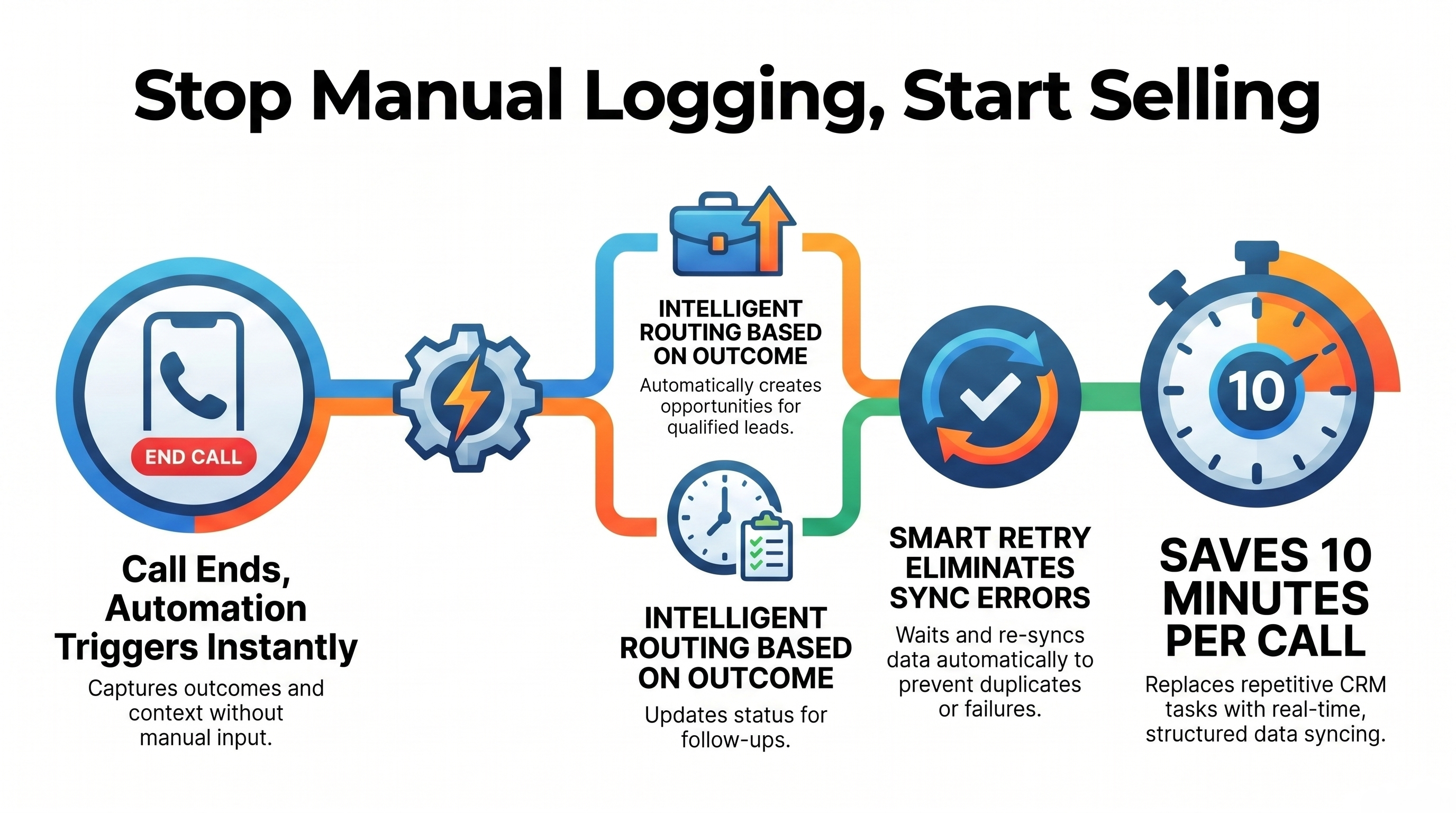
What should take seconds often turns into 5–10 minutes of repetitive CRM work per call.
At scale, this creates a serious operational drain:
lost selling time, reduced momentum, and inconsistent CRM data that slowly erodes pipeline accuracy.
Instead of acting as a strategic asset, Salesforce becomes a manual data-entry burden.
Why Manual Call Logging Creates Bottlenecks
Most sales teams still rely on manual post-call workflows such as:
- Updating call dispositions inside Salesforce
- Writing and formatting call notes manually
- Creating or updating leads and opportunities by hand
- Logging follow-ups and next steps individually
- Re-entering data from dialers into CRM systems
As call volume increases, these tasks create compounding inefficiencies.
The result:
- Slower sales velocity
- Inconsistent CRM data quality
- Missed follow-ups and delayed updates
- Increased administrative workload
- Reduced time spent actually selling
The Solution: Smart Call Disposition Automation
To eliminate this friction, we built an intelligent automation system using Make.com, Salesforce, and BatchData that transforms post-call workflows into a fully automated process.
Instead of manual CRM updates, every call outcome is processed, structured, and synced automatically in real time.
This ensures Salesforce remains a clean, accurate, and actionable source of truth—not a manual logging system.
How the Automation Works
1. Call Ends → Workflow Triggered Automatically
As soon as a call is completed in the dialer system, the automation is triggered instantly.
No manual input required from the sales rep.
The system captures:
- Call outcome / disposition
- Conversation context
- Lead or contact reference
2. Intelligent Routing Based on Call Outcome
Not all calls have the same business impact.
Using advanced routing logic, the system categorizes outcomes such as:
- Qualified leads → Create or update Opportunity
- Follow-ups → Update Lead status and schedule next action
- Disqualified leads → Mark as closed-lost or remove from pipeline
This ensures each CRM update reflects actual sales intent—not generic logging.
3. Smart Retry System (Fixing Sync Failures)
One of the biggest challenges in CRM automation is timing mismatch between systems.
To solve this, a smart retry mechanism is implemented:
- If CRM data isn’t ready → system waits
- Rechecks availability after a short delay
- Reprocesses only when records are fully synced
This eliminates:
- Failed updates
- Duplicate records
- Data mismatches
- Manual troubleshooting
4. Automated Notes & Data Structuring
Raw call data from the dialer is processed through BatchData, where it is:
- Cleaned
- Structured
- Standardized
Then Make.com pushes it directly into Salesforce as:
- Call notes
- Interaction history
- Updated CRM fields
This creates a consistent, searchable sales record across the entire organization.
The Impact
📉 Reduced Administrative Workload – No manual CRM logging
⚡ Faster Sales Velocity – Instant post-call updates
📊 Cleaner CRM Data – Structured and consistent records
🎯 Better Lead Management – Accurate opportunity creation
🔁 Zero Duplicate Errors – Smart retry handling ensures reliability
🚀 Higher Productivity – More time spent selling, less time updating systems
Real-Life Use Case
Problem:
A sales team was spending significant time after every call manually updating Salesforce, logging notes, and managing lead status changes.
This reduced active selling time and created inconsistent CRM data.
Solution:
An automated workflow built using Make.com + Salesforce + BatchData that:
- Captured call dispositions automatically
- Routed outcomes intelligently
- Synced structured notes into Salesforce
- Handled sync delays with smart retry logic
Result:
- Instant CRM updates after every call
- Eliminated manual data entry
- Improved pipeline accuracy
- Increased rep productivity and selling time
Why Sales Automation Matters
As call volume grows, manual CRM processes don’t scale—they break.
Without automation:
- Reps spend more time updating systems than selling
- CRM data becomes unreliable
- Revenue opportunities are delayed or lost
Automation ensures sales teams stay focused on revenue-generating activity, not administrative work.
Perfect For
- B2B Sales Teams
- SaaS Companies
- Outbound Call Centers
- SDR/BDR Teams
- High-volume Sales Organizations
- CRM-heavy Workflows
The Future of the Sales Desk
Modern sales success is no longer about how many calls you make—it’s about how efficiently your systems process those calls.
By connecting dialers, automation platforms, and CRMs, organizations can:
- Scale outreach without increasing workload
- Maintain high-quality CRM data
- Eliminate repetitive manual tasks
- Empower reps to focus on closing deals
Automation doesn’t replace sales teams—it upgrades them.
Ready to Eliminate Manual Salesforce Work?
Your team shouldn’t be spending hours updating CRM records after every call.
They should be closing deals, building relationships, and driving revenue.
🚀 Let’s automate your sales workflow and turn your CRM into a fully intelligent system.
For a demo or consultation, just contact us.