

Folk CRM — Monday.com Integration

Connect monday.com with Folk CRM to automate contact and company management without manual data entry. With the custom Folk CRM integration by Codex Solutions International, you can seamlessly create, update, retrieve, and synchronize customer records between both platforms while keeping your sales and operational workflows fully aligned.

Folk CRM Features for monday.com

The Flok CRM app for monday.com helps you:

  • Create People in Folk CRM automatically
  • Trigger workflows when new Companies are created
  • Synchronize customer data across both platforms
  • Support powerful no-code automations
  • Update People information
  • Retrieve Company information
     

    Built for:

Use Cases

Automate customer and company management between monday.com and Folk CRM with intelligent workflows. Keep your CRM synchronized, eliminate repetitive data entry, and ensure your sales teams always have access to accurate customer information.

Automatically Create People from monday.com

Overview
Automatically create new people in Folk CRM whenever customer or lead information is added or updated in monday.com. Eliminate duplicate data entry while ensuring every contact is instantly available in your CRM.

How it works:

  1. Trigger: Workflow
    A status change or workflow event in monday.com initiates the automation.
  2. Create Person in Folk CRM
    The integration automatically creates the person inside Folk CRM.
  3. Map Customer Information
    • First Name
    • Last Name
    • Email Address
    • Phone Number
    • Address
    • Job Title
  4. Update monday.com
    Optionally save the returned Person ID back into your monday.com board for future automations.

Result:
Customer records are created instantly without duplicate data entry, keeping both platforms synchronized and reducing administrative effort.

Automatically Sync New People from Folk CRM

Overview
Keep monday.com updated automatically whenever a new person is created inside Folk CRM. This enables sales, marketing, and operations teams to collaborate using the latest customer information.

How it works:

  1. Trigger: Watch New Person Trigger
    The integration continuously monitors Folk CRM for newly created people
  2. Trigger Automation
    When a new person is detected, the workflow starts automatically.
  3. Create monday.com Item
    • A new item is generated inside your selected monday.com board using the person’s information.
  4. Continue Your Workflow
    Use monday.com automations for onboarding, sales tracking, customer management, or internal processes.

Result:
Both platforms stay synchronized automatically without imports, exports, or manual updates.

Built for Speed, Accuracy, and Smarter CRM Management

These intelligent workflows eliminate repetitive manual work, reduce administrative overhead, and ensure seamless synchronization between monday.com and Folk CRM.

By automating customer creation, record updates, and real-time synchronization, your team can focus on building stronger customer relationships instead of managing repetitive CRM tasks.

Whether you’re handling leads, maintaining customer records, or coordinating sales activities, this integration keeps your data accurate, organized, and accessible across both platforms.

With real-time synchronization between monday.com and Folk CRM, your teams can collaborate more effectively while improving productivity and eliminating duplicate data entry.

How to Install & Use the Folk CRM App (Step-by-Step Guide)

Follow these simple steps to connect Folk CRM with monday.com and start automating your customer management workflows.

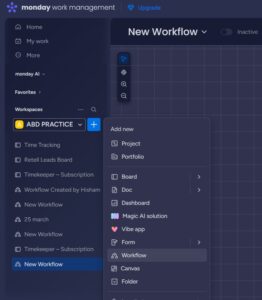
Once the application is installed, navigate to “Add Item” within your workspace and select “Workflow” to begin.
 

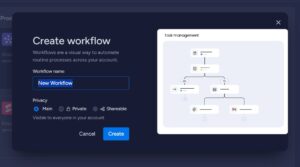
Enter a suitable name for your workflow and click on the “Create” button to proceed.
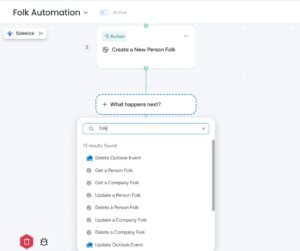
Similarly, in the Action section, search for “Folk CRM” to view and select from the available actions.

Let’s Build Something Great Together

Explore our powerful suite of custom apps and automation solutions designed to streamline your business or book a consultation to get tailored guidance for your needs.

The Digital Growth Community

Unlock the power of Make.com

Join Our Exclusive Skool Community And Start Building Smarter Wrokflows Today!