
Bring Housecall Pro field service operations directly into your monday.com workflows with the custom Housecall Pro app built by Codex Solutions International.
The Housecall Pro app for monday.com helps you:
Built for:
Streamline your field service operations with intelligent automation that connects monday.com and Housecall Pro. From creating customers and managing service jobs to scheduling appointments and generating estimates, eliminate manual data entry and keep your customer and operational data perfectly synchronized.

Overview
When a new customer request is added to monday.com, automatically create a customer record inside Housecall Pro without manual data entry.
How it works:
Result:
Customer information is automatically transferred to Housecall Pro, eliminating duplicate data entry and reducing administrative work.
Overview
Create professional estimates in Housecall Pro when customers request pricing information.
How it works:
Result:
Sales teams can deliver estimates faster while keeping the entire process tracked in monday.com.
Overview
Automatically generate Housecall Pro jobs when a lead becomes a confirmed service request.
How it works:
Result:
Field teams receive jobs faster while office staff avoid repetitive manual setup.
These intelligent workflows remove repetitive manual work, improve team productivity, and ensure seamless communication between monday.com and Housecall Pro.
By automating customer management, job creation, appointment scheduling, and estimate generation, your team can focus on delivering outstanding service while keeping operations organized and fully synchronized.
Follow these quick steps to install the Retell AI app and start using it inside your monday.com workspace.
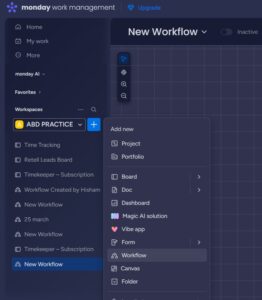
Once the application is installed, navigate to “Add Item” within your workspace and select “Workflow” to begin.
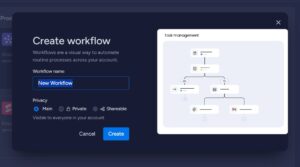
Enter a suitable name for your workflow and click on the “Create” button to proceed.
Click on “Choose a Trigger”.
If you want to monitor calls, you can either browse the available options or search for “Housecall Pro” to access its trigger functionalities.
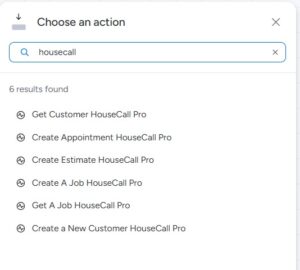
Similarly, in the Action section, search for “Housecall Pro” to view and select from the available actions.
Explore our powerful suite of custom apps and automation solutions designed to streamline your business or book a consultation to get tailored guidance for your needs.
Codex Solutions International © 2026. All rights reserved