How to Turn 400-Page PDFs into Data Gold in Minutes: The Automation Blueprint
The Problem: When Documents Become Data Bottlenecks
For businesses that handle large volumes of documents, a 300- or 400-page PDF can quickly become more than just a file—it can become a serious operational bottleneck.
Important customer details, financial information, records, contracts, and other critical data can be buried across hundreds of pages. Finding and transferring that information manually means employees have to search through documents, copy data, organize spreadsheets, and repeatedly check their work for mistakes.
The bigger the document, the bigger the problem.
What should be a simple data extraction task can easily turn into hours of repetitive administrative work. And when the same process needs to be repeated every day or every week, the workload becomes impossible to scale efficiently.
The solution is to stop treating large PDFs as documents that need to be manually read and start treating them as data sources that can be processed automatically.
This automation blueprint combines OneDrive, PDF.co, OpenAI, Google Sheets, and Make to transform massive PDF files into structured, usable data with minimal human intervention.
Takeaway #1: Break the 400-Page Problem into 10-Page Pieces
The first challenge is the sheer size of the document.
Trying to process an entire 400-page PDF in one step can create unnecessary complexity. The AI has to work through enormous amounts of information while trying to identify the specific details that actually matter.
Instead, the automation breaks the document into smaller sections.
Using PDF.co, the system automatically splits the original PDF into 10-page chunks.
This creates a much more manageable processing environment for the AI.
The workflow becomes:
- A 400-page PDF enters the system.
- PDF.co splits the document into 10-page sections.
- Each section is processed individually.
- The extracted information is collected for the next stage.
This approach gives the AI a focused dataset instead of forcing it to process hundreds of pages at once.
400 pages → 10-page chunks → targeted extraction
The result is a workflow designed to make large documents easier to process, analyze, and automate.
Takeaway #2: Let AI Extract the Information Instead of Your Team
Once the PDF has been divided into smaller sections, the next step is extracting the information that actually matters.
Each 10-page chunk is sent to OpenAI with a predefined prompt that tells the system exactly what information to identify.
Instead of an employee manually searching through the document, the AI processes the content and extracts the required fields automatically.
Depending on the business use case, this could include:
- Customer information
- Invoice numbers
- Dates
- Addresses
- Product details
- Financial figures
- Contract information
- Reference numbers
- Line items
- Other business-specific data
The important part is that the output isn’t simply another block of text.
The information is extracted into a structured format that can be processed by the next stage of the automation.
This means the team no longer has to spend hours searching for information that is already sitting inside the PDF.
The document contains the data. Automation makes that data usable.
Takeaway #3: The Second AI Pass Creates Cleaner, More Reliable Data
Extracting the information is only part of the challenge.
Large documents often contain information that continues from one page to another. A table might begin on page 10 and continue onto page 11. A customer record could be split across two separate chunks.
If every section is processed independently and the results are simply combined, the final dataset could contain duplicates, incomplete records, or formatting inconsistencies.
That’s why this workflow uses a second AI processing stage.
The first AI pass focuses on extraction.
The second AI pass focuses on reconciliation and refinement.
It takes the extracted information from all the individual chunks and processes it again to:
- Combine fragmented records
- Remove duplicate information
- Correct formatting issues
- Reconcile overlapping data
- Organize the information consistently
- Prepare the final dataset for delivery
This creates a two-stage intelligence system.
First pass: Extract the data.
Second pass: Clean and structure the data.
“What used to take hours of manual effort now takes minutes.”
The goal isn’t simply to automate extraction.
The goal is to produce clean, structured information that can immediately be used by the business.
Takeaway #4: The Entire Process Runs Automatically
The biggest advantage of this system is that employees don’t have to manually move the document through every stage.
The entire workflow is connected through Make, which acts as the central automation engine.
Here’s how the process works:
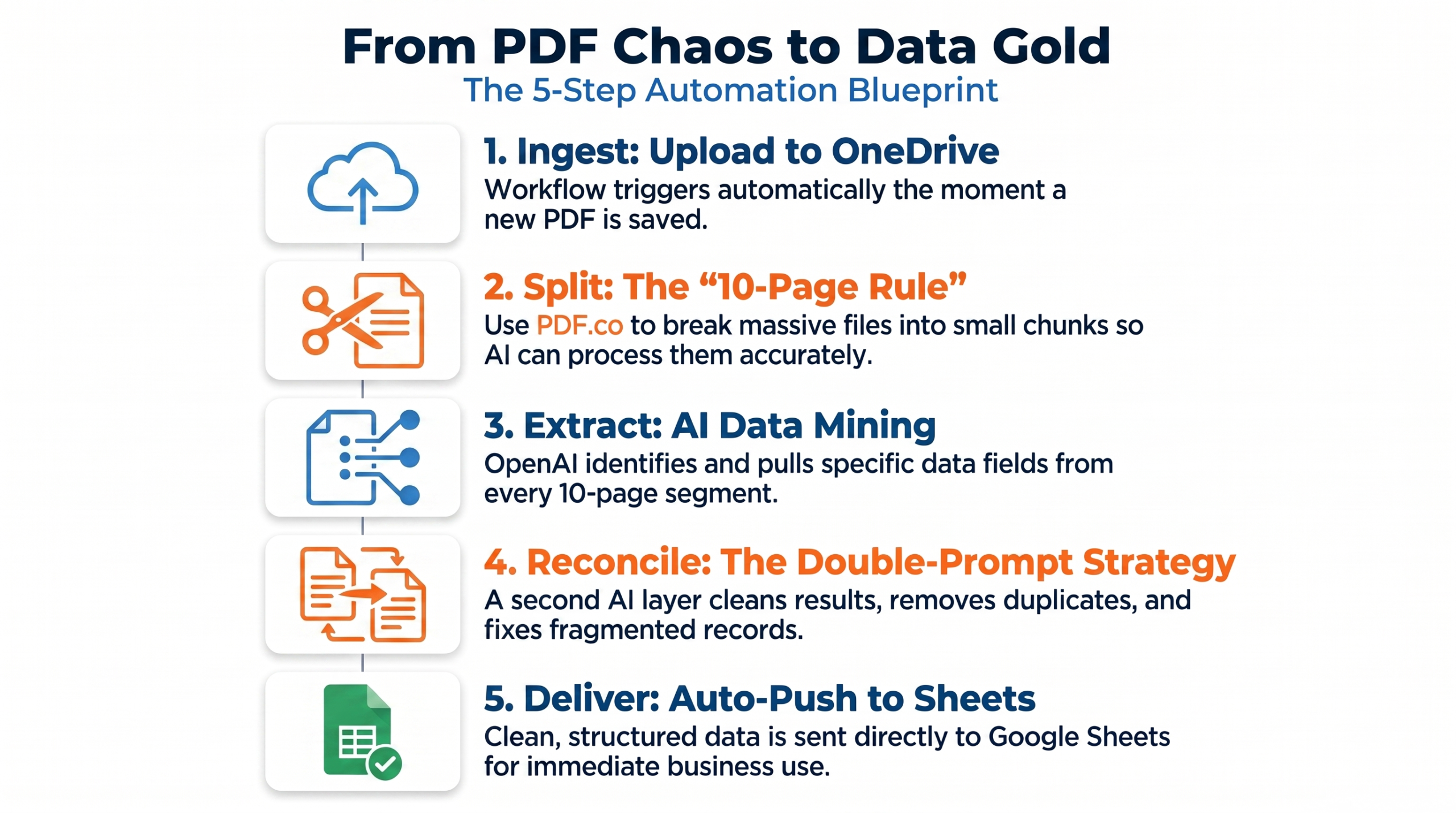
Step 1: Upload the PDF
The original document is placed inside a designated OneDrive folder.
Step 2: Trigger the Automation
The new file automatically triggers the workflow.
Step 3: Split the Document
PDF.co divides the large PDF into 10-page sections.
Step 4: Extract the Data
Each section is processed by OpenAI to identify the required information.
Step 5: Reconcile the Results
A second AI process combines the extracted information, removes inconsistencies, and creates the final structured dataset.
Step 6: Deliver the Data
The completed information is automatically pushed into Google Sheets.
Instead of an employee spending hours working through a document, the process becomes:
Upload → Process → Extract → Refine → Deliver
No manual copying.
No endless spreadsheet work.
No searching through hundreds of pages.
Takeaway #5: Make Connects the Entire Technology Stack
The individual tools each have an important role, but the real power comes from connecting them into one automated workflow.
The technology stack includes:
- OneDrive: Stores and receives the original PDF files.
- PDF.co: Splits large PDFs into manageable sections.
- OpenAI: Extracts the required information from each section.
- Second AI Pass: Reconciles and cleans the extracted information.
- Google Sheets: Stores the final structured data.
- Make: Connects and orchestrates the entire workflow.
Make becomes the central nervous system of the process.
It controls when each step happens, passes information between platforms, and ensures that the output from one stage becomes the input for the next.
This means the workflow isn’t limited to processing one document.
Once built, the same system can repeatedly process new PDFs using the same logic.
Takeaway #6: Replace Data Entry with Data Intelligence
The biggest benefit of this automation isn’t simply the number of minutes saved.
It’s what your team can do with those minutes.
When employees aren’t spending their day manually extracting information from documents, they can focus on higher-value activities such as:
- Analyzing trends
- Reviewing business performance
- Identifying risks
- Making strategic decisions
- Improving customer experiences
- Acting on the information instead of entering it
This creates a fundamental shift in how the organization uses its people.
Instead of:
Manual extraction → Spreadsheet management → Data cleanup
You move toward:
Automated extraction → Structured data → Business analysis
That’s where the real value of document automation comes from.
From 400 Pages to Actionable Data
A 400-page PDF doesn’t need to represent 400 pages of manual work.
With the right automation architecture, massive documents can be transformed into structured datasets without requiring someone to manually search through every page.
The workflow handles the repetitive work in the background while your team focuses on what actually matters.
This is especially valuable for organizations dealing with large volumes of recurring documents, where even a few hours saved per document can quickly turn into dozens of hours saved every month.
Automation doesn’t just make document processing faster.
It makes document-heavy operations more scalable.
The Future of Document Automation
The next generation of business operations won’t be built around employees manually moving information from one system to another.
It will be built around connected systems that automatically capture, process, organize, and deliver information where it’s needed.
By combining AI with workflow automation, businesses can turn unstructured documents into structured business intelligence without creating additional administrative overhead.
The question isn’t whether your team can manually process a 400-page PDF.
They probably can.
The better question is:
Why should they have to?
If your organization is still spending hours extracting information from large documents, there is an opportunity to replace that repetitive workload with an automated system that works in the background.
For a demo or consultation, JUST CONTACT US.